iFANN
    ค้นหาใน iFANN...
    เข้าสู่ระบบ
    หน้าแรก
    ข่าว
    วิดีโอ
    รูปภาพ
    GIF
    สำรวจ
    โพล
    รางวัล
    iFAMOUS
    วิกิ
    อนิเมะ
    ห้อง
    การแจ้งเตือน
    ข้อความ
    ที่บันทึกไว้
    โปรไฟล์
    วิกิรางวัลiFAMOUSอันดับอุตสาหกรรมรางวัลครีเอเตอร์รางวัลผู้ใช้ข้อกำหนดความเป็นส่วนตัวหลักเกณฑ์ชุมชนแจ้งลบ / DMCAช่วยเหลือนักพัฒนา

    © 2026 iFANN

    หน้าแรก
    ค้นหา
    ข้อความ
    การแจ้งเตือน
    โปรไฟล์
    รูปภาพ
    Ts Floyd
    Ts Floyd@ts_floyd3d
    🏢SpaceXAI🏢SpaceX💭AI
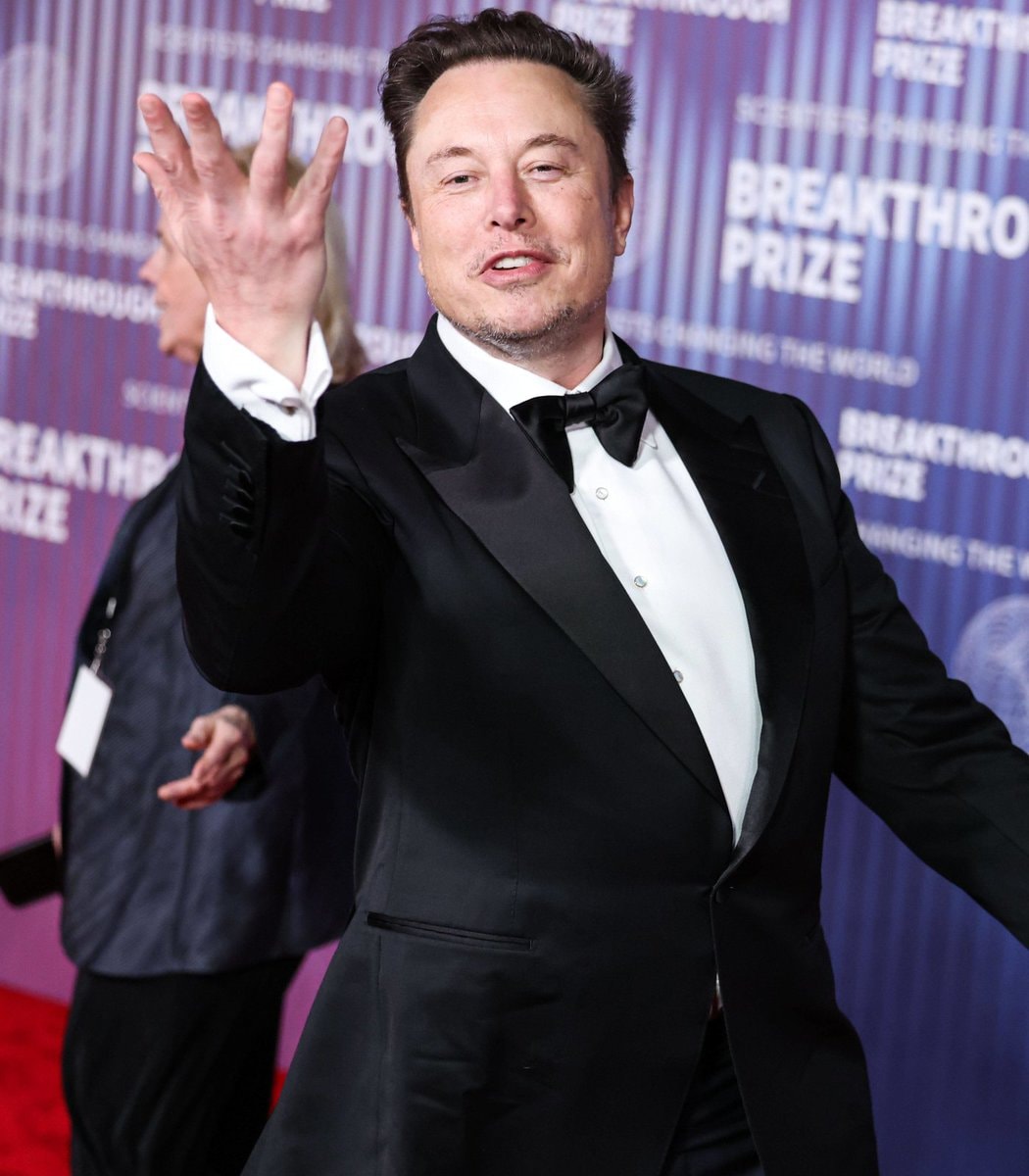
    20 GROKBOT TIPS SpaceX

    @ts_floydThe SpaceXAI team just dropped an official guide titled 'How to Use Grok Bot at 101% of Its power', and the technical depth here is worth a serious look. A Grok Bot operates as a standalone agent equipped with its own cloud computer, complete with a browser, file system, and terminal that keeps running even if your laptop lid is shut. Setting one up starts with three specific fields: name, title, and a description that maps out the workflow exactly as you would execute it. Prioritize connectors for established services like Gmail, Slack, GitHub, and Notion; only reserve computer use features for tools that lack dedicated integrations. You can train a bot by walking it through a flow once, which records the actions into a skill within ten minutes, though these recorded skills remain drafts until you add decision rules and failure handling protocols. An effective skill definition must cover usage triggers, inputs, steps, validation methods, outputs, and any approval requirements before it is ready for deployment. Once saved, these skills are invoked in the composer simply by typing the slash symbol. Every task demands four core elements: the action itself, the location, the context, and a clear criteria for completion. Each bot has the capacity to manage up to fifty routines, where you assign owners, set schedules and timezones, and define protocols for missing data. Test runs perform real-world actions like clicking websites or modifying files, but they should always be run on safe examples first. Event triggers require narrow rules to prevent noise and excessive usage; for instance, triggering on every new Slack message creates too much activity. Automation should handle the preparation phase, while human approval remains mandatory for sending, buying, deleting, publishing, or making production changes. Permission rules are written in plain language directly within the Agent settings. A review agent can then utilize allow and block lists to approve, block, or escalate specific actions. Since one login credential is shared across all bots, trust in every single bot accessing that account is essential. The architecture often uses an outer and inner loop structure to separate context gathering from specialist execution. For multi-team projects, assign one channel per project with a maximum of five bots plus a PM bot. Giving the PM bot a task board with a Blocked column allows stuck bots to flag issues and ping the owner. Templates serve to share instructions, memories, skills, and plugins, requiring review like third-party software before adding a bot. For critical decisions, force bots to re-check live sources rather than relying on memory, and re-test routines after site changes occur. These twenty notes summarize the best practices for configuring autonomous agents, and reading the full article on building a team of GrokBot agents from scratch provides the necessary foundation.

    ดูโพสต์ต้นฉบับ

    20 GROKBOT TIPS SpaceX

    รูปภาพโดย @ts_floyd· Sep 17, 2026· SpaceXAI

    เกี่ยวกับรูปนี้

    The image is a graphic listing "20 GROKBOT TIPS". The focus is on the text and layout of the tips, presented in a clean, organized, and informative style. The mood is educational and professional, with a modern aesthetic. A notable detail is the SpaceX logo at the bottom right, indicating the source. The on-screen text includes "20 GROKBOT TIPS" at the top and "SPACEX" at the bottom.

    ดูรูปภาพ SpaceXAI ทั้งหมดอ่านวิกิ SpaceXAI

    ?

    รูปภาพ SpaceXAI เพิ่มเติม

    ดูรูปภาพ SpaceXAI ทั้งหมด
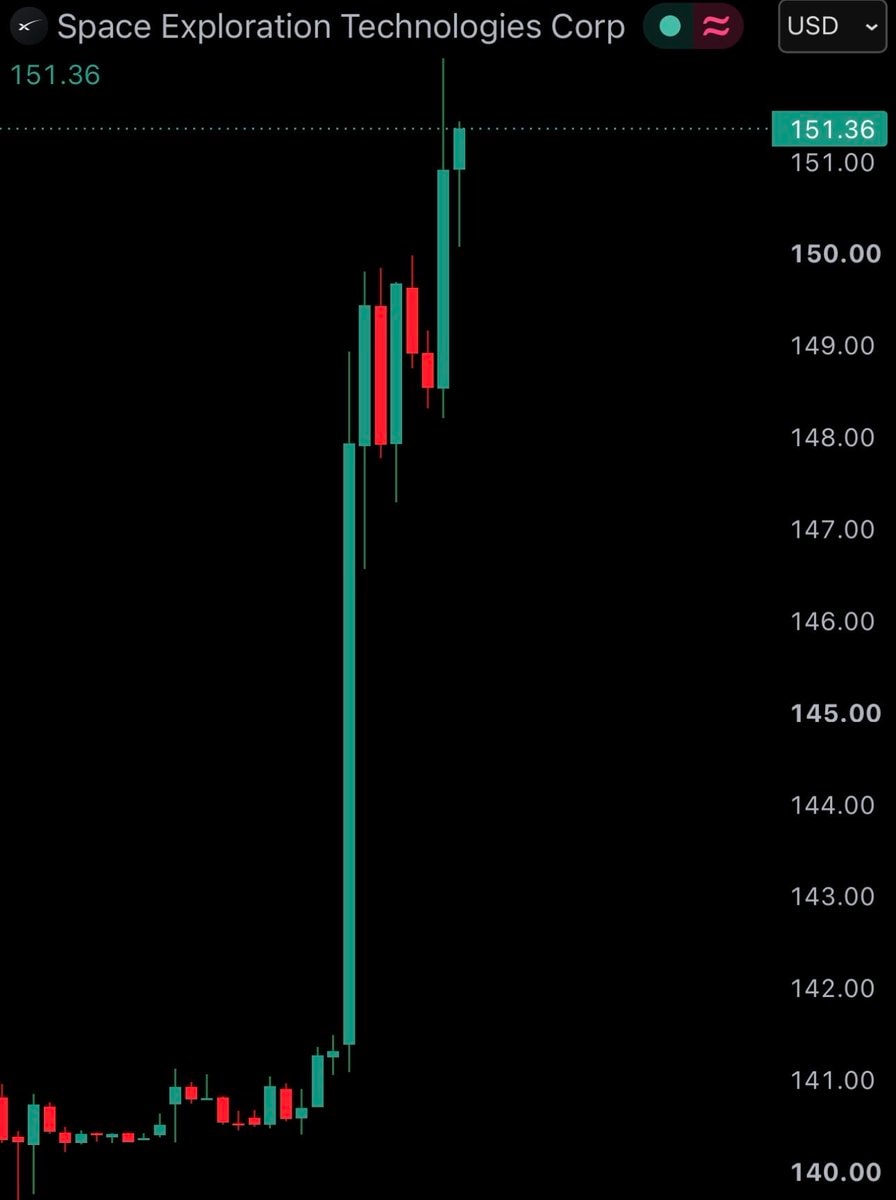
    Elon Musk SpaceX MarsElon Musk SpaceX MarsElon Musk SpaceX NASA contract2Elon Musk SpaceX NASA contractSpaceX stock surgeSpaceX stock surgeElon Musk SpaceX Nvidia AI2Elon Musk SpaceX Nvidia AIElon Musk Tesla or SpaceX gift choiceElon Musk Tesla or SpaceX gift choiceElon Musk on assets2Elon Musk on assetsSpaceX Paris summit invite pressureSpaceX Paris summit invite pressureSpaceX stock hits $150SpaceX stock hits $150NASA Roman Space Telescope launch2NASA Roman Space Telescope launchElon Musk SpaceX Starship2Elon Musk SpaceX StarshipOpenAI ends Cursor partnership after SpaceX acquisition2OpenAI ends Cursor partnership after SpaceX acquisitionOpenAI ends Cursor partnership after SpaceX acquisitionOpenAI ends Cursor partnership after SpaceX acquisitionElon Musk SpaceX 2033 revenue prediction2Elon Musk SpaceX 2033 revenue predictionElon Musk SpaceX Louisiana spaceport2Elon Musk SpaceX Louisiana spaceportElon Musk SpaceX Starbase Louisiana2Elon Musk SpaceX Starbase LouisianaSpaceX Starbase Louisiana constructionSpaceX Starbase Louisiana constructionElon Musk SpaceX Falcon Starship plan2Elon Musk SpaceX Falcon Starship planElon Musk SpaceX Starlink airlines2Elon Musk SpaceX Starlink airlines
    รูปภาพ
    Ts Floyd
    Ts Floyd@ts_floyd3d
    🏢SpaceXAI🏢SpaceX💭AI
    20 GROKBOT TIPS SpaceX

    @ts_floydThe SpaceXAI team just dropped an official guide titled 'How to Use Grok Bot at 101% of Its power', and the technical depth here is worth a serious look. A Grok Bot operates as a standalone agent equipped with its own cloud computer, complete with a browser, file system, and terminal that keeps running even if your laptop lid is shut. Setting one up starts with three specific fields: name, title, and a description that maps out the workflow exactly as you would execute it. Prioritize connectors for established services like Gmail, Slack, GitHub, and Notion; only reserve computer use features for tools that lack dedicated integrations. You can train a bot by walking it through a flow once, which records the actions into a skill within ten minutes, though these recorded skills remain drafts until you add decision rules and failure handling protocols. An effective skill definition must cover usage triggers, inputs, steps, validation methods, outputs, and any approval requirements before it is ready for deployment. Once saved, these skills are invoked in the composer simply by typing the slash symbol. Every task demands four core elements: the action itself, the location, the context, and a clear criteria for completion. Each bot has the capacity to manage up to fifty routines, where you assign owners, set schedules and timezones, and define protocols for missing data. Test runs perform real-world actions like clicking websites or modifying files, but they should always be run on safe examples first. Event triggers require narrow rules to prevent noise and excessive usage; for instance, triggering on every new Slack message creates too much activity. Automation should handle the preparation phase, while human approval remains mandatory for sending, buying, deleting, publishing, or making production changes. Permission rules are written in plain language directly within the Agent settings. A review agent can then utilize allow and block lists to approve, block, or escalate specific actions. Since one login credential is shared across all bots, trust in every single bot accessing that account is essential. The architecture often uses an outer and inner loop structure to separate context gathering from specialist execution. For multi-team projects, assign one channel per project with a maximum of five bots plus a PM bot. Giving the PM bot a task board with a Blocked column allows stuck bots to flag issues and ping the owner. Templates serve to share instructions, memories, skills, and plugins, requiring review like third-party software before adding a bot. For critical decisions, force bots to re-check live sources rather than relying on memory, and re-test routines after site changes occur. These twenty notes summarize the best practices for configuring autonomous agents, and reading the full article on building a team of GrokBot agents from scratch provides the necessary foundation.

    ดูโพสต์ต้นฉบับ
    20 GROKBOT TIPS SpaceX

    รูปภาพโดย @ts_floyd· Sep 17, 2026· SpaceXAI

    เกี่ยวกับรูปนี้

    The image is a graphic listing "20 GROKBOT TIPS". The focus is on the text and layout of the tips, presented in a clean, organized, and informative style. The mood is educational and professional, with a modern aesthetic. A notable detail is the SpaceX logo at the bottom right, indicating the source. The on-screen text includes "20 GROKBOT TIPS" at the top and "SPACEX" at the bottom.

    ดูรูปภาพ SpaceXAI ทั้งหมดอ่านวิกิ SpaceXAI

    ?

    รูปภาพ SpaceXAI เพิ่มเติม

    ดูรูปภาพ SpaceXAI ทั้งหมด
    Elon Musk SpaceX MarsElon Musk SpaceX MarsElon Musk SpaceX NASA contract2Elon Musk SpaceX NASA contractSpaceX stock surgeSpaceX stock surgeElon Musk SpaceX Nvidia AI2Elon Musk SpaceX Nvidia AIElon Musk Tesla or SpaceX gift choiceElon Musk Tesla or SpaceX gift choiceElon Musk on assets2Elon Musk on assetsSpaceX Paris summit invite pressureSpaceX Paris summit invite pressureSpaceX stock hits $150SpaceX stock hits $150NASA Roman Space Telescope launch2NASA Roman Space Telescope launchElon Musk SpaceX Starship2Elon Musk SpaceX StarshipOpenAI ends Cursor partnership after SpaceX acquisition2OpenAI ends Cursor partnership after SpaceX acquisitionOpenAI ends Cursor partnership after SpaceX acquisitionOpenAI ends Cursor partnership after SpaceX acquisitionElon Musk SpaceX 2033 revenue prediction2Elon Musk SpaceX 2033 revenue predictionElon Musk SpaceX Louisiana spaceport2Elon Musk SpaceX Louisiana spaceportElon Musk SpaceX Starbase Louisiana2Elon Musk SpaceX Starbase LouisianaSpaceX Starbase Louisiana constructionSpaceX Starbase Louisiana constructionElon Musk SpaceX Falcon Starship plan2Elon Musk SpaceX Falcon Starship planElon Musk SpaceX Starlink airlines2Elon Musk SpaceX Starlink airlines